A defined business purpose
Start the agent around a task that matters to the business. Specify the intended output rather than granting an undefined mandate.

Intelligence
Connect model assistance to a defined business purpose. Bring together relevant information, permitted tools and human review so prepared work can move into a coordinated enterprise journey.
Inside the product
Explore actual captured Inflow views. Change the view, open the original and read the context beside it.
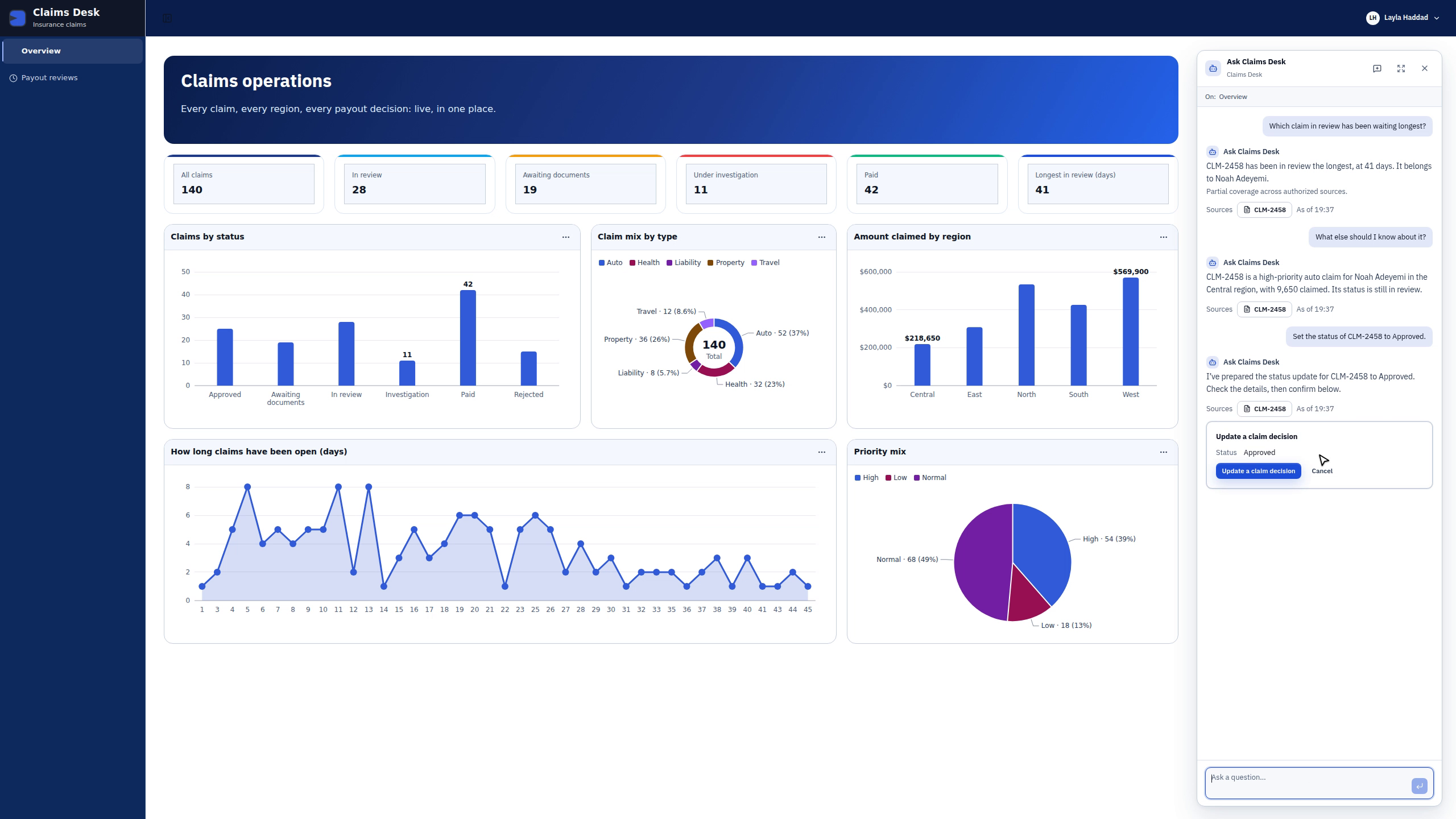
Ask which claim has waited longest. Explore its context, review a proposed status update and explicitly confirm it. After a reload, the dashboard’s In review count changes from 28 to 27.
Recorded with a synthetic workspace editor in an English development application. The answer includes a partial-coverage note. The action changes a record status; it is not a lifecycle task completion or payment. The dashboard updates on reload. Model waiting periods and an idle hold were shortened; no responses or outcomes were invented.
Read The future of headless workStart the agent around a task that matters to the business. Specify the intended output rather than granting an undefined mandate.
Give the task the information relevant to its purpose. Connect permitted business records and supporting context to preparation work.
Use model assistance within the agreed solution design. Review model needs alongside information access and business expectations.
An agentic task may need a business service as well as text. Define permitted tool use and connect the result to the intended next action.
Identify where a person must examine or decide. Present prepared information with enough context to support responsible review.
Connect preparation work to the application or process using it. Keep the owner and expected outcome visible across the handoff.
01 / A closer look
Ask App brings conversation into a configured business application. In the recorded Claims Desk example, the assistant identifies the claim that has waited longest, cites its record and answers a follow-up about the same claim. The question, source and business context stay together.
02 / A closer look
A useful assistant can move the conversation toward an action while keeping review visible. The Claims Desk recording shows one proposed status change, a confirmation control and a completion receipt. A dashboard reload then reflects the updated record.
Discuss the objects, responsibilities and boundaries that make this capability useful in your environment.
The records and actions available to the agent
The person responsible for consequential decisions
How prepared output enters the business journey
Illustrative solution scenarios to shape a useful demonstration.
Prepare a claim review summary from permitted policy and claim information.
Assemble supporting context before an exception decision.
Summarize supplier submissions and hand comparison context to a reviewer.
Bring your business journey, AI environment and integration needs. Let’s explore the right starting point.
Request a demo