
Inflow · Enterprise Agentic Platform
One platform.
Every part connected.
Bring AI agents, applications, processes and enterprise data together. Build the experience. Coordinate the work. Keep people in control.
Explore your use caseThe unified Inflow platform
Ask InflowIntent becomes the starting point.
Work through conversationMCP & integrations
Applications
Lifecycles & BPMN
Rules & decisions
Enterprise context
Operations & insight
Explore the architecture
Explore each capability to see how it contributes to a connected enterprise application.
Logical product architecture
See the product in operationFrom architecture to operation
The whole operation. The detail of one case.
Start with a connected lifecycle. Follow a case through its actual route, then inspect the people, messages and decisions inside a state. These are native Inflow views, with the original interface preserved.
The whole lifecycle
Read the states, permitted routes and distribution of 1,006 fictional claims. Then follow the work inside a state or inspect one case.
Native development capture. Counts and timings belong to a synthetic demonstration, not a customer or performance benchmark.
Explore this capability1,006fictional cases in this lifecycle demonstration
A shared view of states, exceptions, handoffs and individual journeys. The same platform concepts extend to the processes you configure for your organization.
Explore lifecycles & casesCreate. Connect. Work.
Build with agents.
Work through conversation.
Bring AI agents into application development through the tools and permissions you configure. Bring conversational assistance into the applications people use. Connect intent, business context and human review across both experiences.
01 / ASK INFLOW
Your operation. In the conversation.
Move from the big picture to the question that matters. Bring workload, trends and exceptions into the conversation, then consider what to do next.
Explore headless workClaims Desk: ask, investigate, review, confirm
Ask which claim has waited longest. Explore its context, review a proposed status update and explicitly confirm it. After a reload, the dashboard’s In review count changes from 28 to 27.
- 01Find the longest-waiting claim
- 02Explore the same cited record
- 03Review, confirm and inspect the result
About this recording
Recorded with a synthetic workspace editor in an English development application. The answer includes a partial-coverage note. The action changes a record status; it is not a lifecycle task completion or payment. The dashboard updates on reload. Model waiting periods and an idle hold were shortened; no responses or outcomes were invented.
Read The future of headless workUnderstand the operation
Bring trends, case mix, stage workload and queue activity into one view.
Investigate the exception
Use the conversation to explore the question behind a chart or a waiting case.
Consider the next action
Make the intended scope clear and keep review visible before consequential actions.
02 / APPLICATION DESIGN
Give the application its shape.
Design interfaces around business records, decisions and the people using them. Inspect the native Inflow form designer, and explore the capabilities behind the experience.
Explore Interface Designer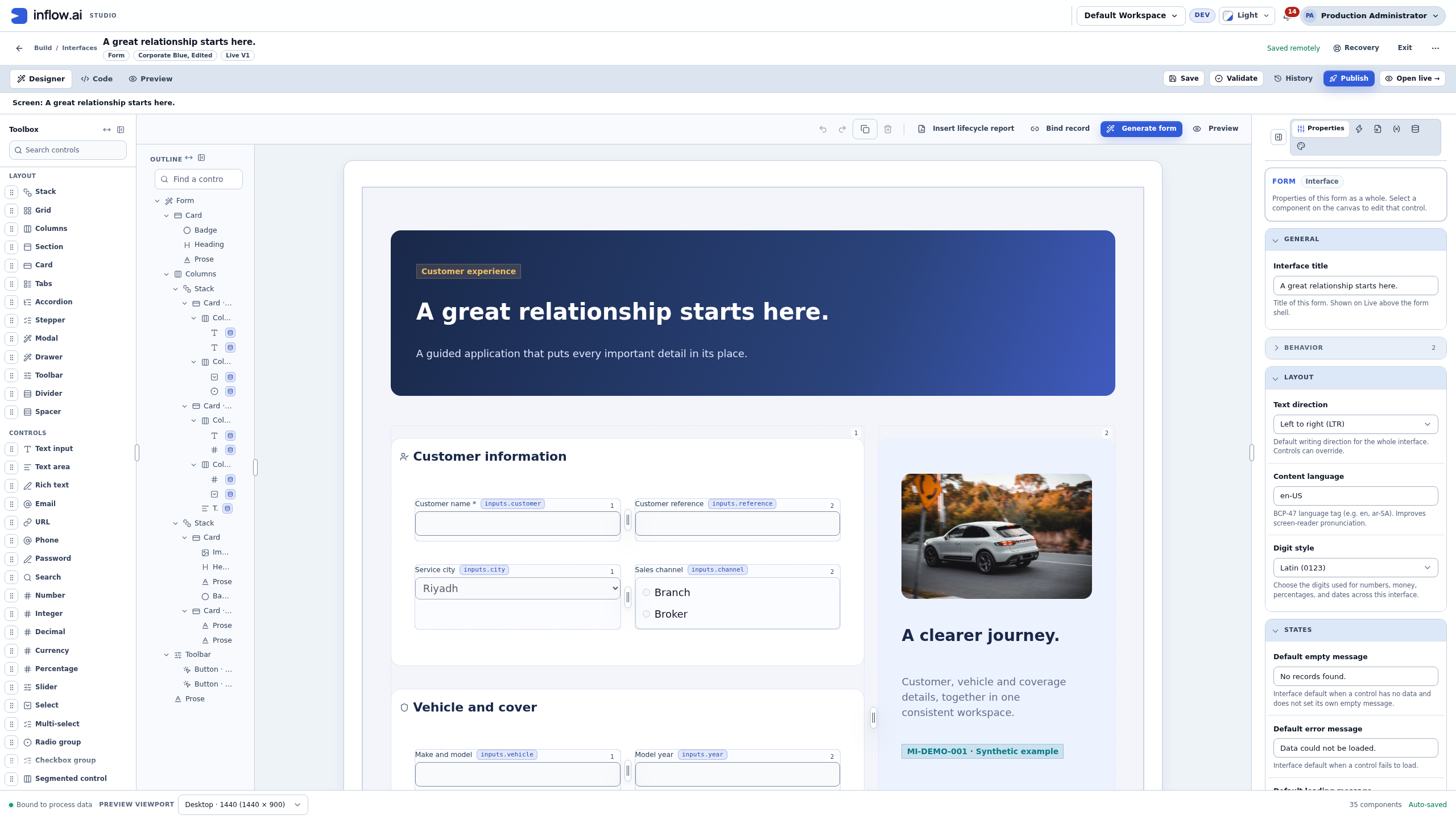
03 / MCP
Connect the agent to the application.
MCP gives an agent a defined connection to the tools a configured server exposes. Explore available tools, their scope and the permissions required for your use case.
Explore MCP connectivityThe connection to discuss
- Your agent
- Configured tools
- Inflow application
Architecture overview. Available operations depend on the configured server and permissions.
PERSPECTIVE / THE FUTURE OF WORK
The future of headless work
Ask for the outcome. Let AI bring the context, prepare the action and put the decision in your hands. A new way to work with enterprise applications, through conversation.
Read the article“What needs my attention?”
A question. The context. A decision in your hands.Built on an enterprise foundation.
Bring applications, data, business logic and AI together in one connected platform. Explore the capabilities behind the experience.
Lifecycles & case managementBPM & process orchestrationProcess simulationRules engine & decisionsAI agentsAI fabric & model gatewayMCP & agent connectivityInterface DesignerBusiness apps & mobileData models & data fabricQuery BuilderAPIs, services & connectorsEvents & event coordinationDocuments & contentReports & operational insightMonitoring & operationsGovernance & access
Discover the connected platformSovereign AI
Your intelligence. Your operating context.
A meaningful AI strategy starts with control: over model choices, information boundaries, permissions and human review.
Explore sovereign AIModel choices
Evaluate models appropriate to the task, their information requirements and the controls around their use.
Information boundaries
Identify which information is needed, where it may move and which organizational policies apply.
Permissions & review
Define permitted actions and where a person must review or decide.
Deployment requirements
Agree hosting, integration and operational requirements for the specific engagement.
Built around the way your industry works.
Start with the journeys that matter to your organization.
Inside the product
Real interfaces. A closer perspective.
Inspect native application and builder views, with full-size previews and the context behind each capture.
Native visual form designer
Native component palette, outline, form canvas and property controls.
Insurance application form
Native Inflow application UX with synthetic insurance examples. External business services are not connected.
Journey intelligence
Native application reporting over saved synthetic records. Figures are demonstration data.
Get a clearer picture.
Explore the platform, understand the ideas and prepare the right questions.
Product datasheet
One platform. A connected view.
A six-page introduction to Inflow’s capabilities. PDF in English.
Read the datasheetWhat should sovereign AI mean for your enterprise?
A practical guide to the questions that matter.
Read the guideSee Inflow in the context of your organization.
Bring your business journey, AI environment and integration needs. Let’s explore the right starting point.
Request a demo