Visual process design
Describe the activities and paths of a business process. A visual model gives business and technical teams a shared execution conversation.

Orchestrate
Bring services, people, decisions and events into one visual process. Make the intended sequence understandable, including waits, alternative paths and the work needed when something goes wrong.
Inside the product
Explore actual captured Inflow views. Change the view, open the original and read the context beside it.
A message wait, a human document task and a decision gateway explain the work behind Awaiting documents. The side panel connects that flow to waiting cases.
Native execution view with fictional records. The November activity chart is empty because the demonstration cases were started in October.
Explore this capabilityDescribe the activities and paths of a business process. A visual model gives business and technical teams a shared execution conversation.
Combine an automated service activity with work assigned to a person. Keep the point of human judgment visible in the design.
Branch according to a business condition or the event arriving first. The retained BPMN design includes an event-based gateway feeding message and deadline routes.
A process can wait for meaningful changes instead of assuming immediate completion. Model message, timer and signal responses within the request context.
Document how work responds when an activity fails. The retained design connects a conversion error to human correction and another processing attempt.
Move from the business model into review and operation. Historical controls expose Design, Verify, Live, Monitor and Debug views according to model state.
Discuss the objects, responsibilities and boundaries that make this capability useful in your environment.
Who owns each human decision
How waits, deadlines and exceptions are handled
How a process draft is reviewed before publication
Illustrative solution scenarios to shape a useful demonstration.
Coordinate purchase approval, supplier acknowledgement, document conversion and acceptance review.
Route a permit through checks, clarification and authorized review.
Combine automated context preparation with a person’s exception decision.
Inside the product
Inspect native application and builder views, with full-size previews and the context behind each capture.
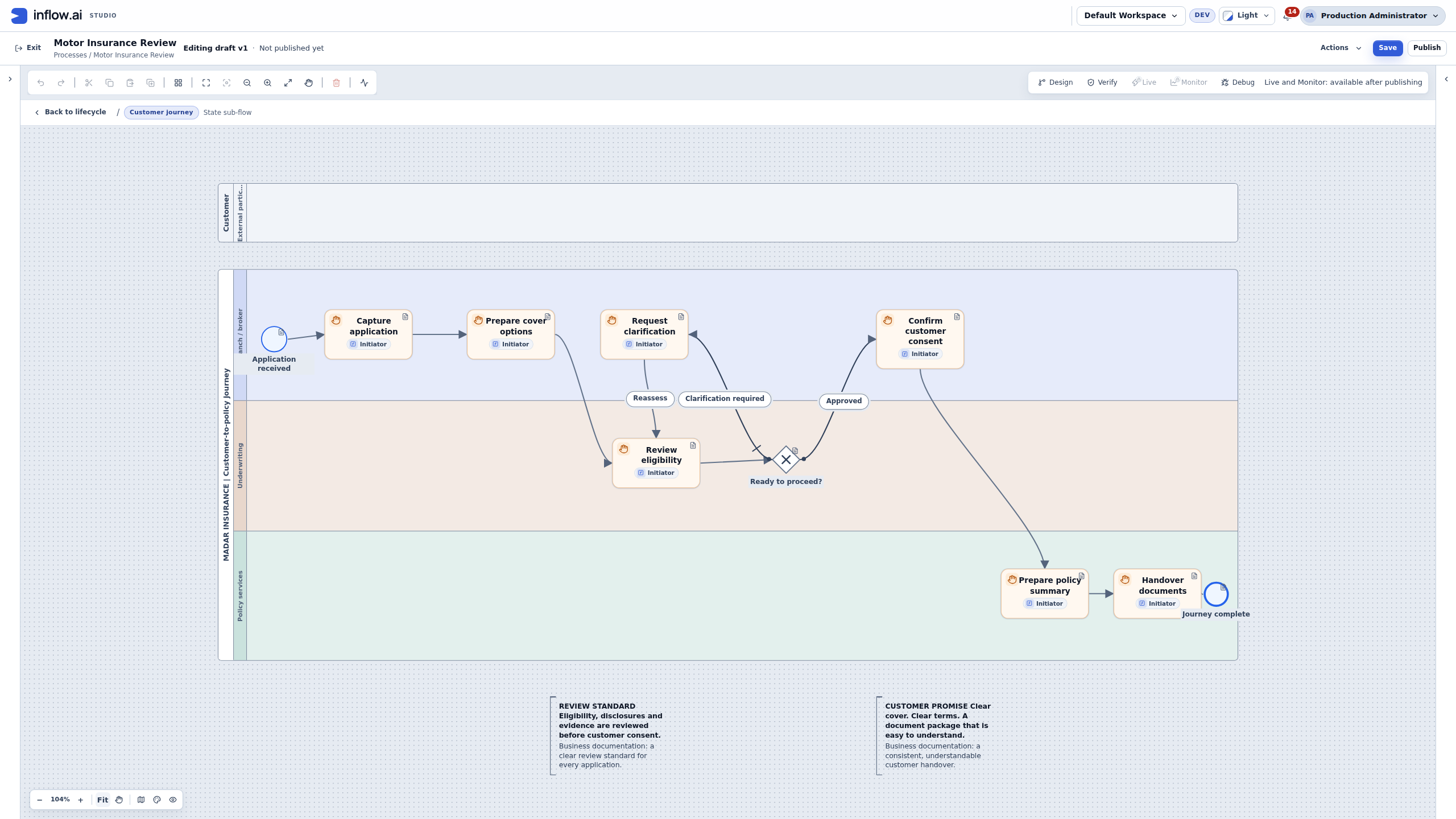
Native BPMN pools, responsibility lanes and a review loop. Unpublished demonstration draft.
Native process-documentation panel with an annotated BPMN draft.
Bring your business journey, AI environment and integration needs. Let’s explore the right starting point.
Request a demo