
The Inflow platform
Intelligence. Applications. The work between them.
Build enterprise experiences, model the decisions and lifecycles behind them, connect systems and agents, and keep people responsible for the decisions that matter.
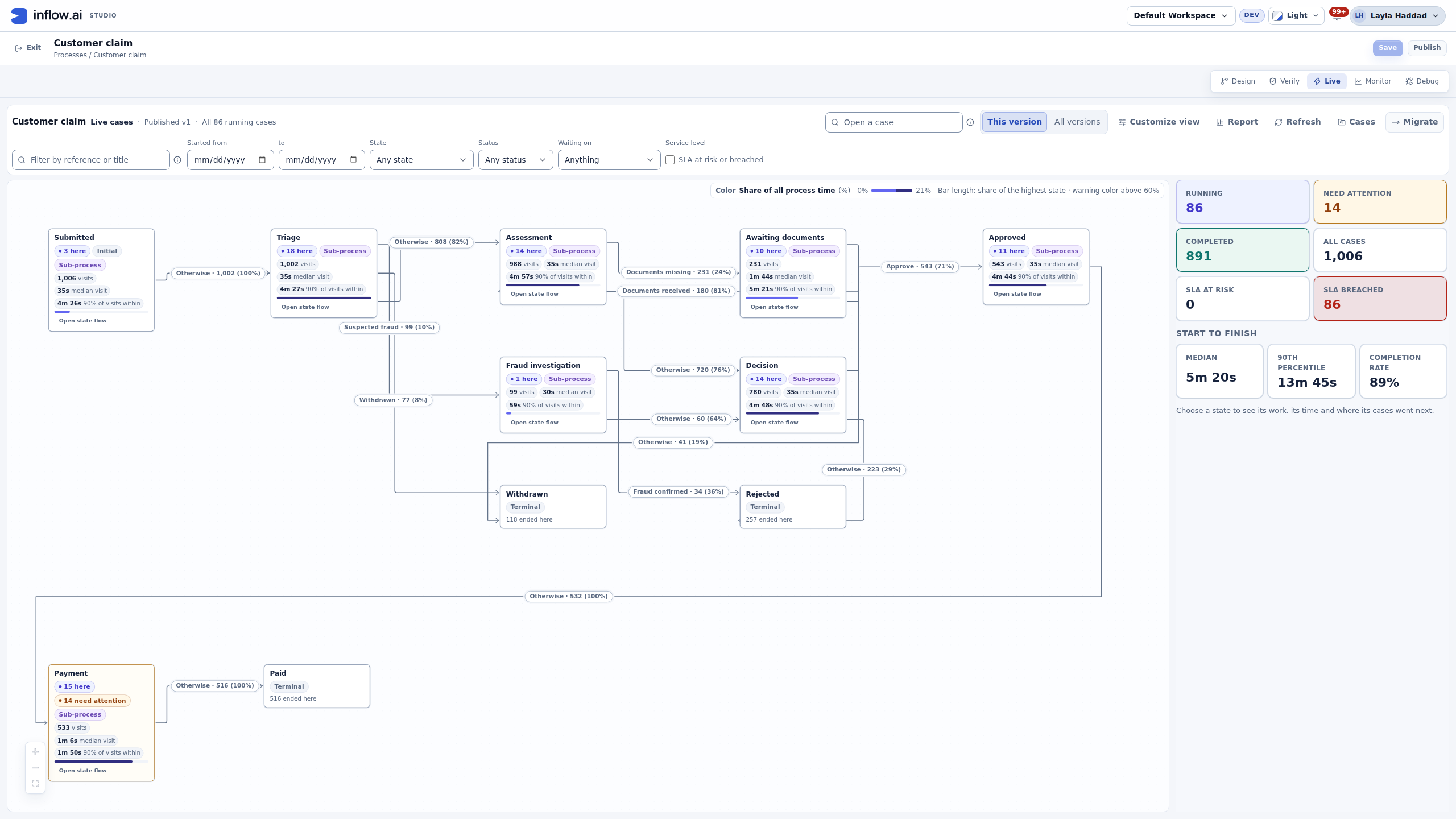
Native lifecycle operations across 1,006 fictional claims, with states, transitions and case workload.
Inside the product
Real interfaces. A closer perspective.
Inspect native application and builder views, with full-size previews and the context behind each capture.
Native visual form designer
Native component palette, outline, form canvas and property controls.
Insurance workbench
Native Inflow application UX with synthetic insurance examples. External business services are not connected.
Journey intelligence
Native application reporting over saved synthetic records. Figures are demonstration data.
From the full operation to a single case.
Inspect genuine lifecycle, case and BPMN views with fictional demonstration records.
The whole lifecycle
Read the states, permitted routes and distribution of 1,006 fictional claims. Then follow the work inside a state or inspect one case.
Native development capture. Counts and timings belong to a synthetic demonstration, not a customer or performance benchmark.
Explore this capabilityWork through the application, in conversation.
A real Ask App conversation explores a claim, prepares a record change and asks for confirmation.
Claims Desk: ask, investigate, review, confirm
Ask which claim has waited longest. Explore its context, review a proposed status update and explicitly confirm it. After a reload, the dashboard’s In review count changes from 28 to 27.
- 01Find the longest-waiting claim
- 02Explore the same cited record
- 03Review, confirm and inspect the result
About this recording
Recorded with a synthetic workspace editor in an English development application. The answer includes a partial-coverage note. The action changes a record status; it is not a lifecycle task completion or payment. The dashboard updates on reload. Model waiting periods and an idle hold were shortened; no responses or outcomes were invented.
Read The future of headless workBefore you change the process
Explore the alternative. Question the assumptions.
Process simulation brings scenario settings and modelled outcomes into the same conversation. Inspect the actual configuration, then explore what the retained example run reports.
Set up a scenario
Inspect the actual Monte Carlo controls: case batch, rate-card profile, approval setting, random seed and iterations. Make the assumptions explicit before reading output.
Native configuration view, not an executed result. Inputs shown here do not include explicit staffing or arrival-pattern controls.
Explore this capabilityA complete view of the platform.
Seventeen connected capabilities, each with its own purpose, features, design concepts and business scenarios.
Lifecycles & case management
Model business states, the work inside them and the transitions between them. Keep human decisions, returned work and exceptional outcomes visible throughout the case journey.
Explore capabilityOrchestrateBPM & process orchestration
Bring services, people, decisions and events into one visual process. Make the intended sequence understandable, including waits, alternative paths and the work needed when something goes wrong.
Explore capabilityOrchestrateProcess simulation
Explore process alternatives with explicit scenarios. Configure Monte Carlo inputs, inspect modelled outcomes and read recorded history separately, before deciding what to change.
Explore capabilityOrchestrateRules engine & decision tables
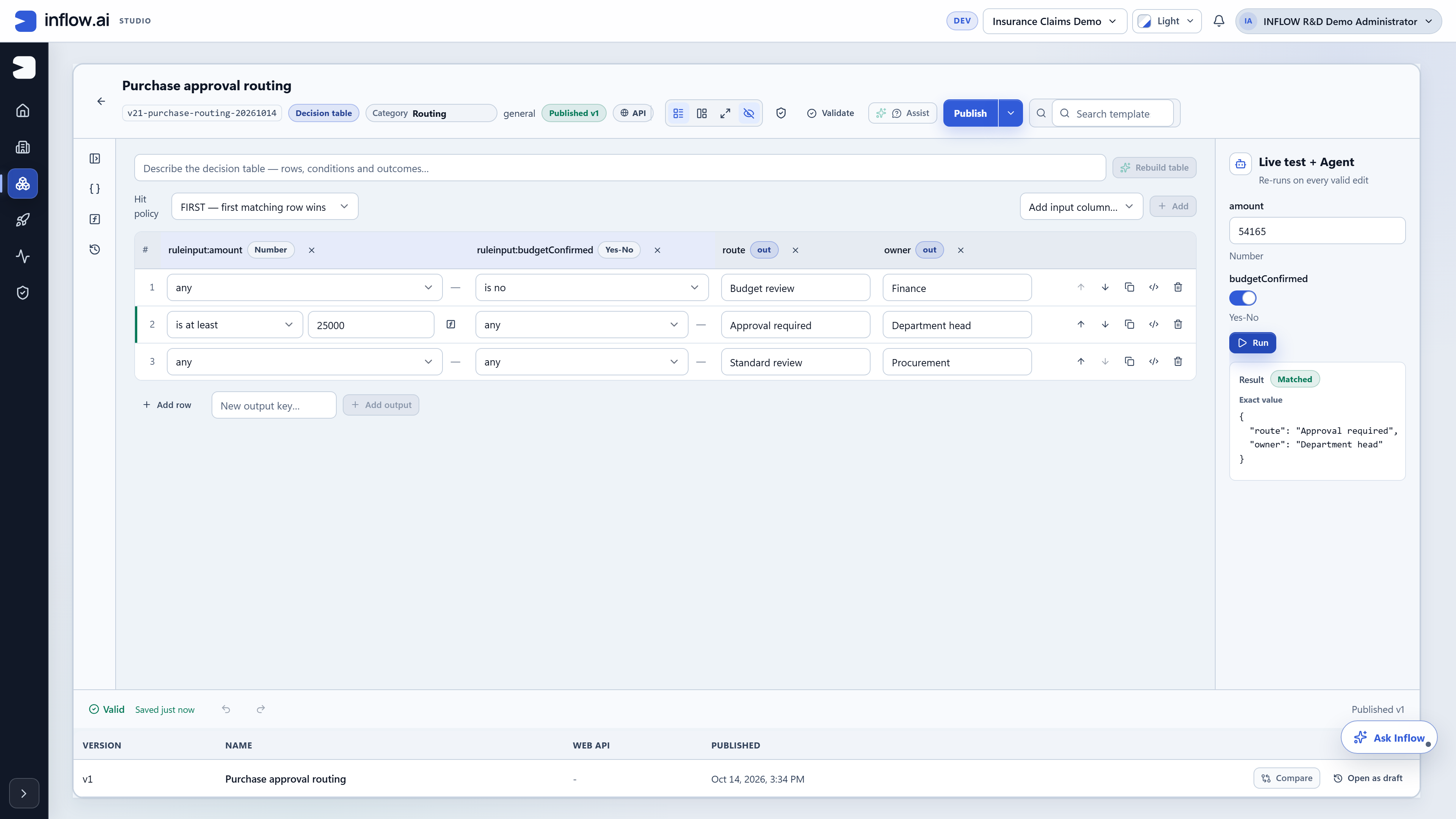
Turn business facts into explicit decision outcomes. Use readable conditions, named outputs and representative test values to make routing and review logic understandable across the solution.
Explore capabilityIntelligenceAI agents & agentic automation
Connect model assistance to a defined business purpose. Bring together relevant information, permitted tools and human review so prepared work can move into a coordinated enterprise journey.
Explore capabilityIntelligenceAI fabric & model gateway
Coordinate selected AI capabilities with business context and connected services. Evaluate model choices, information boundaries and operating responsibilities as one solution-design conversation.
Explore capabilityIntelligenceMCP & agent connectivity
MCP connects AI applications to discoverable tools and their schemas. Explore the discovery-to-invocation pattern while keeping the permitted action, information boundary and returned result visible.
Explore capabilityBuildInterface Designer
Create forms and business experiences that connect information to action. Bring fields, selections, tables and supporting documents into the task context, then inspect the experience before opening it to users.
Explore capabilityBuildBusiness applications & mobile
Give employees, partners and service users a coherent way to work. Connect structured information, responsibilities, documents and human decisions in experiences designed around their roles and devices.
Explore capabilityBuildData fabric & data models
Model the records, fields and relationships behind business work. Connect that context to applications, agent preparation and decisions, with source access and information boundaries defined for the solution.
Explore capabilityBuildQuery Builder
Assemble the enterprise information needed by a screen, decision or service. Start from a business question and keep the result connected to the records, relationships and access boundaries behind it.
Explore capabilityConnectAPIs, services & connectors
Bring APIs, services and connectors into the enterprise journey. Define what each connection does, the information it exchanges and the authentication, mapping and exception behavior it needs.
Explore capabilityConnectEvents & exception coordination
Coordinate messages, deadlines, signals and errors with the work they affect. Make waiting behavior and exception responses explicit, including the human follow-up needed when the expected path cannot continue.
Explore capabilityOperateDocument generation & management
Bring supporting files, generated outputs and review context into the same journey. Define how documents are collected, used, processed and made available alongside the business outcome they support.
Explore capabilityOperateReports & operational insight
Give teams a clear overview of active work and items requiring attention. Connect measures, charts and record lists to the business definitions and user responsibilities that make them meaningful.
Explore capabilityOperateLive monitoring & work visibility
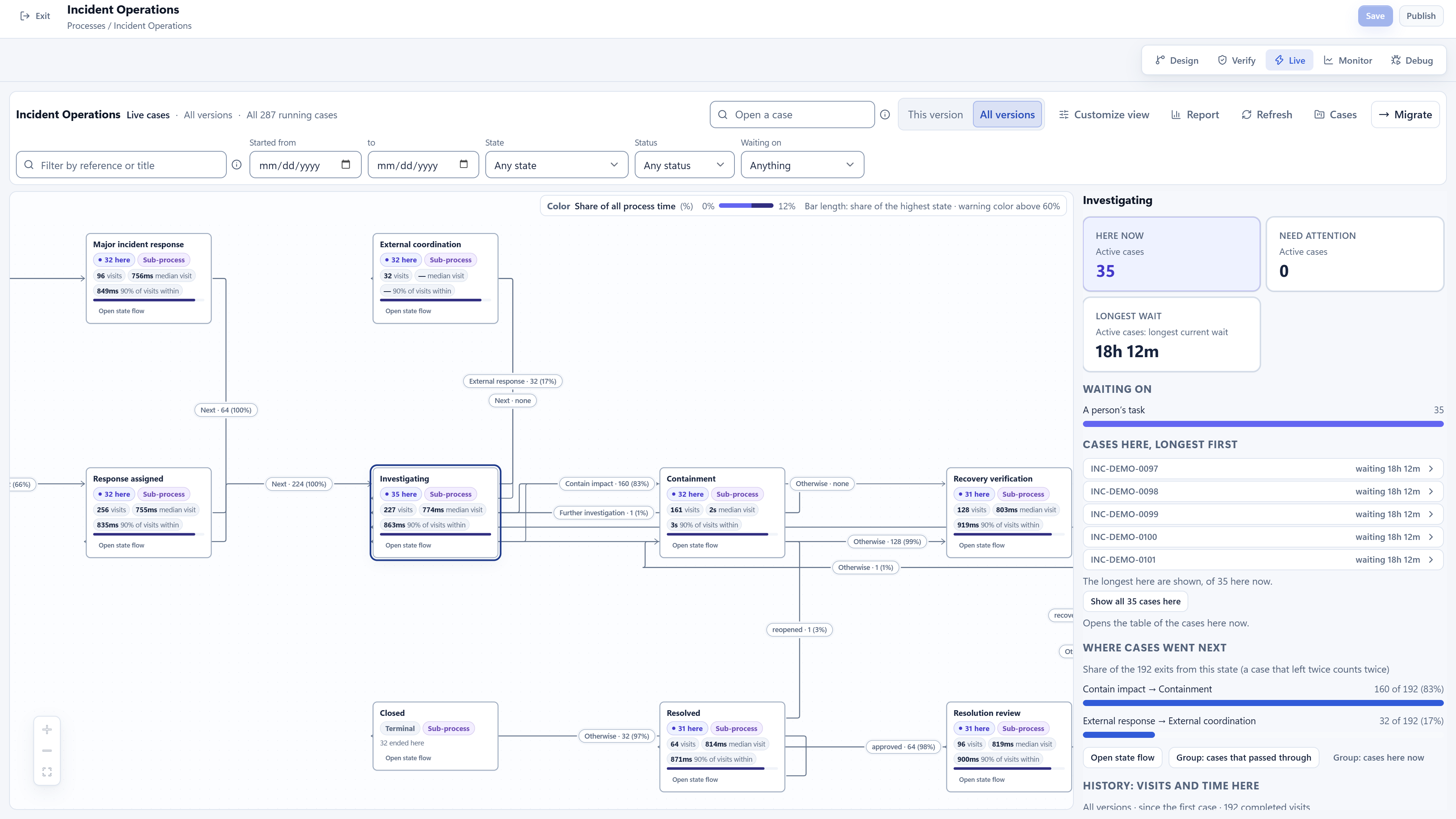
Explore where cases are, what they are waiting on and which paths they have taken. Bring state context, case filters and operational history together so responsible teams can investigate the work.
Explore capabilityOperateGovernance, access & architecture
Connect access, human accountability and operational visibility across intelligent work. Agree the information boundaries, architecture and responsibilities needed for the organization’s specific environment.
Explore capabilitySee real Inflow product views.
A closer look at retained product demonstrations, including BPMN, decision tables and lifecycle operations.
The connection is the capability.
A business request can bring together a designed interface, enterprise context, an AI-assisted summary, a routing decision, a lifecycle transition and a human approval.
See Inflow in the context of your organization.
Bring your business journey, AI environment and integration needs. Let’s explore the right starting point.
Request a demo